
Swarm
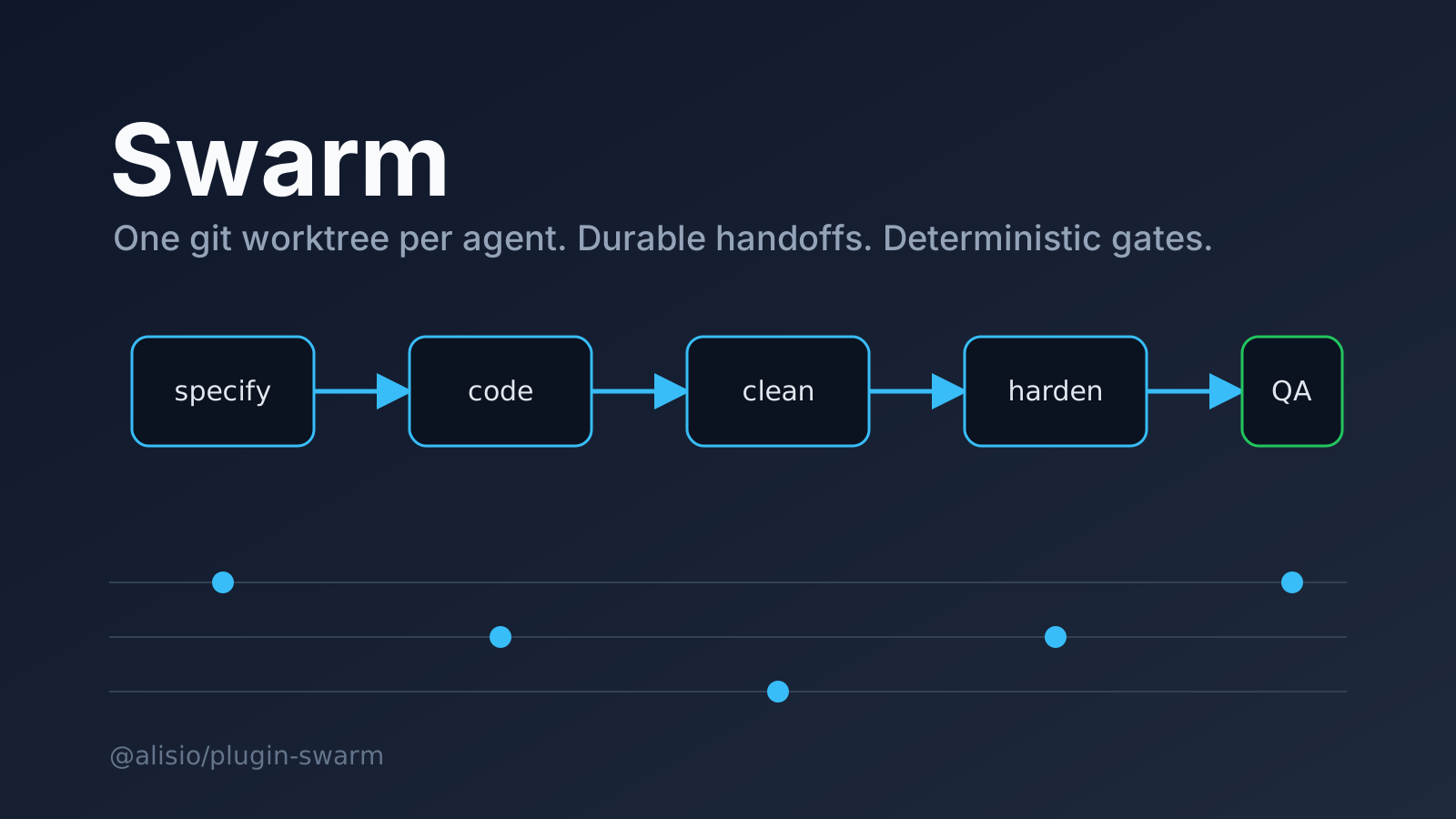
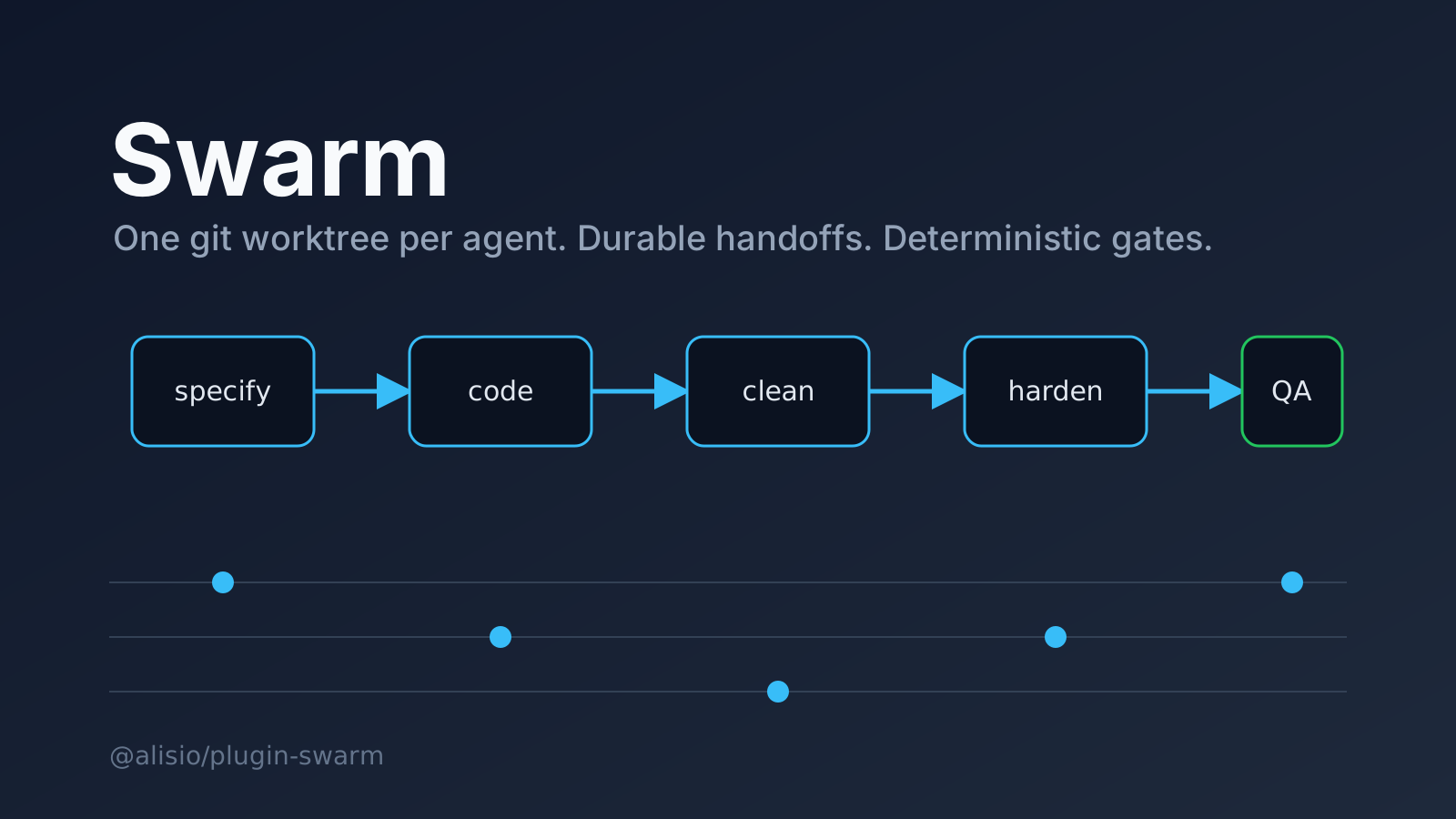
Runs a handoff-driven pipeline of specialised agents, each in its own git worktree, with durable handoffs and human gates.
Install
alisio install npm:@alisio/plugin-swarm@0.5.3Metadata
| Package | @alisio/plugin-swarm |
|---|---|
| Version | 0.5.3 |
| Published | Nov 9, 2026 |
| Author | Alisio |
| License | MIT |
| Categories | Methodology harness |
| Size | 1.4 MB |
| Dependencies | 0 |
| Peer dependencies | 1 |
| Downloads (last month) | 599 |
| Source | First-party |
| Keywords | alisio-plugin, agent-swarm, multi-agent, git-worktree, methodology |
Español: README.es.md. The two READMEs must be updated together.
Swarm for Alisio runs a pipeline of specialised agents. Each agent works in its own git worktree and passes committed work to the next one through durable handoff files. Deterministic code owns routing, state and quality gates; agents only return strict JSON envelopes that the code validates.
Status: pre-release. Everything below is implemented and tested with scripted fakes, including the local dashboard. The Alisio child-session runner, background execution and the dashboard have not been exercised against a live Alisio host yet; see "Running it for real".
Architecture

Commands, tools, the dashboard and the TUI panel are thin front ends over one services layer, which drives pure domain code through ports (agent runner, isolation, stores, gate runner).
Requirements
- Node.js 22.16 or newer and
@alisio/sdk0.3 to 0.6. git2.28 or newer onPATH. Run/swarm:doctorto check.- No credentials and no network access, except when you clone a GitHub repository.
Install
alisio install npm:@alisio/plugin-swarmQuickstart
/swarm:init
/swarm:doctor
/swarm:pack list
/swarm:project new demo --pack two-pack -- A small todo application
/swarm:task demo new -- Add a form to create todos
/swarm:status
/swarm:dashboard
Commands
| Command | Purpose |
|---|---|
/swarm:init | Create the forge under .alisio/swarm in the workspace. |
/swarm:doctor | Check Node.js, git, the toolchain commands and the workspace. |
/swarm:pack list / show | List shipped and workspace packs, or show one. |
/swarm:project new [--pack ] [--github ] -- | Create and open a project. |
/swarm:project open / close / list | Open, close or list projects. Closing never touches project files. |
/swarm:task new [name] -- | Create a task card and queue it for the first role. |
/swarm:task retry / delete / accept | Retry a stuck task, archive and remove it, or accept its work as it is. |
/swarm:status [project] | Show lanes, tasks and items that need your attention. |
/swarm:approve / | Approve the handoff held at the approval gate. Disabled while document comments exist. |
/swarm:reject / retry|delete|accept [-- comments] | Retry (rejected commit kept under refs/swarm/rejected/, base restored, role re-run with your findings), delete, or accept unchanged. |
/swarm:comment / -- / / clear | Comment on a document of a task waiting for approval, or clear the comments. |
/swarm:answer / -- | Answer a clarification question from a role. |
/swarm:chat [project] -- | Talk to the read-only Lieutenant of a project. |
/swarm:stop | Cancel the project's agents and halt its pump; the project stays open. |
/swarm:run [--seconds <1-3600>] | Run the pump in the foreground until the project is idle (see "Running it for real"). |
/swarm:budget / budget raise | Show the swarm token budget or raise the cap. |
/swarm:dashboard [project|project/task] | Start the local follow-up dashboard and print its link (see "Dashboard"). |
/swarm:teardown --confirm TEARDOWN | Cancel every agent and stop every project. Project files stay. |
A reference is / or the id of an item under needs your attention (approval::). In an interactive session, approve, reject and teardown ask with ui.askQuestions when an argument is missing; headless, the command forms above are the contract.
The tools swarm_status, swarm_task_new, swarm_gate_run and swarm_doctor expose the same services to agents. swarm_gate_run runs one named quality gate for a role and returns its report.
Agents
Every agent is named with the swarm- prefix (swarm-specifier, swarm-coder, swarm-cleaner, swarm-refactorer, swarm-architect, swarm-hardener, swarm-qa, swarm-lieutenant) so the host agent catalog never collides with another plugin that ships a specifier or coder. Pack role ids stay short (coder, qa); one map in the plugin turns a role id into its agent name. Each agent file declares its tools, turn limit, timeout and output budget; children can never call task, delegate, subagent or sessions_create, and read-only roles run with readOnly: true.
Packs
A pack is data: the ordered roles, which role works on the main checkout, the approval gate, quality gates and thresholds. Packs ship with the plugin and can also live in .alisio/swarm/packs/.json in the workspace; a workspace pack shadows a shipped pack with the same name.

The shipped pipelines, in order; the approval gate sits after the specifier in four-pack and six-pack.
| Pack | Pipeline |
|---|---|
two-pack | coder, cleaner |
four-pack | specifier, coder, refactorer, architect (approval after the specifier) |
six-pack | specifier, coder, cleaner, architect, hardener, qa (approval after the specifier) |
The last role's handoff is broadcast merge-only to every other role and moves the card to Done. Default thresholds (coverage 80 percent, complexity 6, CRAP 8, mutation 80 percent) are pack data and can be changed per pack. The CRAP formula is the published CC^2 * (1 - coverage)^3 + CC.
How it works
- Worktrees. The master role works on the project's main checkout. Every other role gets a worktree on the branch
swarm//. Acommit-msghook appendsBy .. - Handoffs. Work travels as a ten-character commit id inside a header-plus-body file under
/.alisio/swarm/handoffs//. Files are the source of truth: after a crash the pump replays the outbox and the board is rebuilt from them. - Merges. The coordinator merges the sender's commit into the receiver's worktree before the receiver runs. Conflicts are handed to the receiving role as part of its task.
- Audit handshake. The first handoff envelope is parked, the same session is asked to re-verify, and an unchanged second envelope releases it.
- Strict envelopes. Invalid output (including output cut short by the turn limit) is rejected, never repaired, and retried at most once before the card becomes blocked and appears under needs your attention.
- Approval gate. In packs with
approval.after, the handoff of that role is held until you approve it. Reject offers retry, delete or accept unchanged. - Clarifications. A role can ask one question; the card shows
clarifyingand the question is persisted, so it survives a restart. Your answer resumes the same session (or a fresh one with the question repeated after a restart). - Holds survive restarts. Clarifications, agent-reported blocks, gate failures, approvals and their comments are persisted. A runtime failure (for example output rejected twice) is retried after a restart instead.
Handoffs, audits and task states
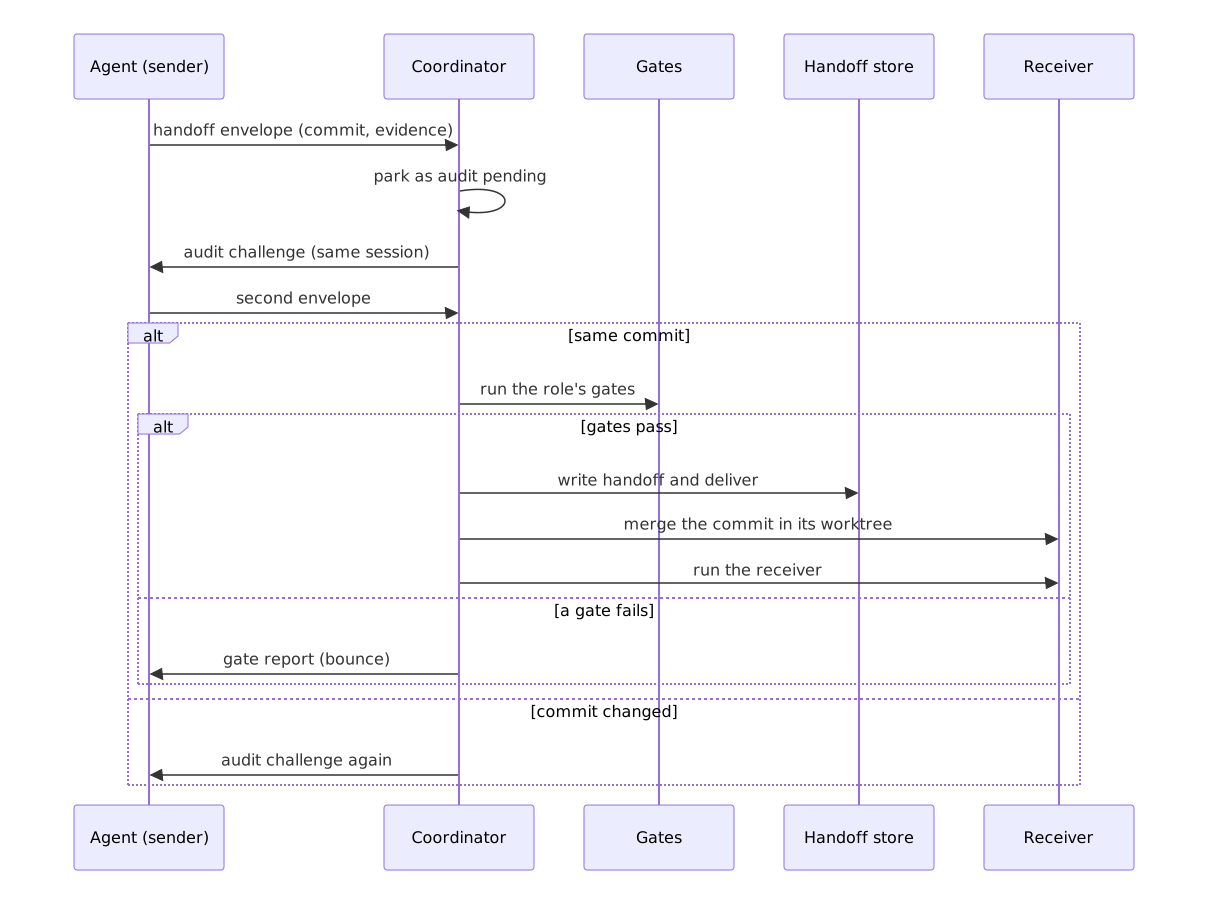
A handoff is parked, audited with a second envelope, gated by code, then delivered and merged.

A card is queued, working, merging, waiting_approval, clarifying, blocked, rejected or done.

The audit releases a handoff only when the second envelope names the same commit and the gates pass.

Approval is blocked while document comments exist; reject offers retry, delete or accept unchanged.
Quality gates
After the audit is unchanged, the coordinator runs the role's gates from the pack (gates block) with the node-ts toolchain profile. A failing gate returns its report to the same role, which fixes it and goes through the audit again. After limits.maxBounces (default 2) failures the task is blocked and you decide: retry (fresh allowance), accept as it is, or delete.
| Gate | What it checks |
|---|---|
tests-green | The profile's test command exits 0. |
test-first | A test file is part of the role's diff since its base commit. |
coverage | Overall line coverage from the coverage summary meets thresholds.coverage. |
crap | For changed functions, complexity and CRAP (CC^2 * (1 - coverage)^3 + CC, using the file's coverage) stay under thresholds.complexity and thresholds.crap. |
dry | No block of 6 identical significant lines duplicated against a changed file. |
mutation | Differential: Stryker runs on the changed source files only and the score meets thresholds.mutation. |
acceptance | The profile's acceptance command (falling back to test) exits 0. |
structure | Skipped with a stated reason: there is no deterministic structure checker yet. |
Thresholds come from the pack, never from constants. Gate processes run from argument arrays with a timeout, an output cap and a scrubbed environment. A gate that cannot run at all (missing tool, unparseable report) does not bounce the role: it blocks the task with the reason.
QA rejection: when the last role reports blocked, its findings go back to the coder by default (or to the role named by rejectTo on that role, or by a route: line in the findings), bounded by maxBounces. A pack may declare parallel stages (adjacent roles that are not the master or the last role): they run concurrently and the next role receives all their commits, merged in pack order, once every role of the stage has handed off.
Toolchain configuration
v1 ships one toolchain profile, node-ts (assets/toolchains/node-ts.json). It declares argument arrays and output parsers, never shell strings. Your project must provide:
| Gate input | Command run | Needs |
|---|---|---|
| tests | npm test --silent | a test script |
| coverage | npx vitest run --coverage --coverage.reporter=json-summary | Vitest with a coverage provider |
| complexity (CRAP) | npx eslint --format json --rule complexity ... | ESLint |
| mutation | npx stryker run --incremental | Stryker with the JSON reporter |
| acceptance | npm run --if-present test:acceptance --silent | optional script; falls back to test |
/swarm:doctor reports which commands are missing. Thresholds and limits (coverage, complexity, crap, mutation, maxBounces, maxAuditRounds) are pack data. Other toolchains (go, java, python, clojure) are not shipped in v1.
Token budget
options.tokenBudget is a soft cap on total tokens across the swarm. When it is reached the pumps stop starting new runs (runs in flight finish) and a decision appears under needs your attention. Raise the cap with /swarm:budget raise . Idle roles never run: there are no eager agents.
Running it for real
Child sessions are created lazily from the session that last issued a /swarm command, with the role's worktree as the workspace, and are cancelled on close, stop, teardown and dispose. The pump runs in the background of the host process. Whether a promise that outlives its command keeps running, how the host schedules concurrent child runs, and how headless permission: ask behaves are not verified against a live host yet. If the background pump stalls, /swarm:run drives it in the foreground for up to an hour; a one-second safety tick restarts stalled work when the process is alive. A pidfile under .alisio/swarm flags a previous process that died without cleaning up.
Options
Set them under pluginOverrides.swarm.options in the Alisio configuration:
| Option | Default | Meaning |
|---|---|---|
maxConcurrent | 3 | Roles running at the same time (1 to 8). |
roles..model | session model | Model for one role. |
tokenBudget | none | Soft cap on total tokens (at least 1000). |
Dashboard
The dashboard is a follow-up view of the swarm running in your workspace. Work is started and managed from the Alisio chat with /swarm:* commands; the page only offers what the chat does poorly: watching many roles at once, reading evidence, and making review decisions next to it. Every role, the Lieutenant included, runs as an Alisio child session.
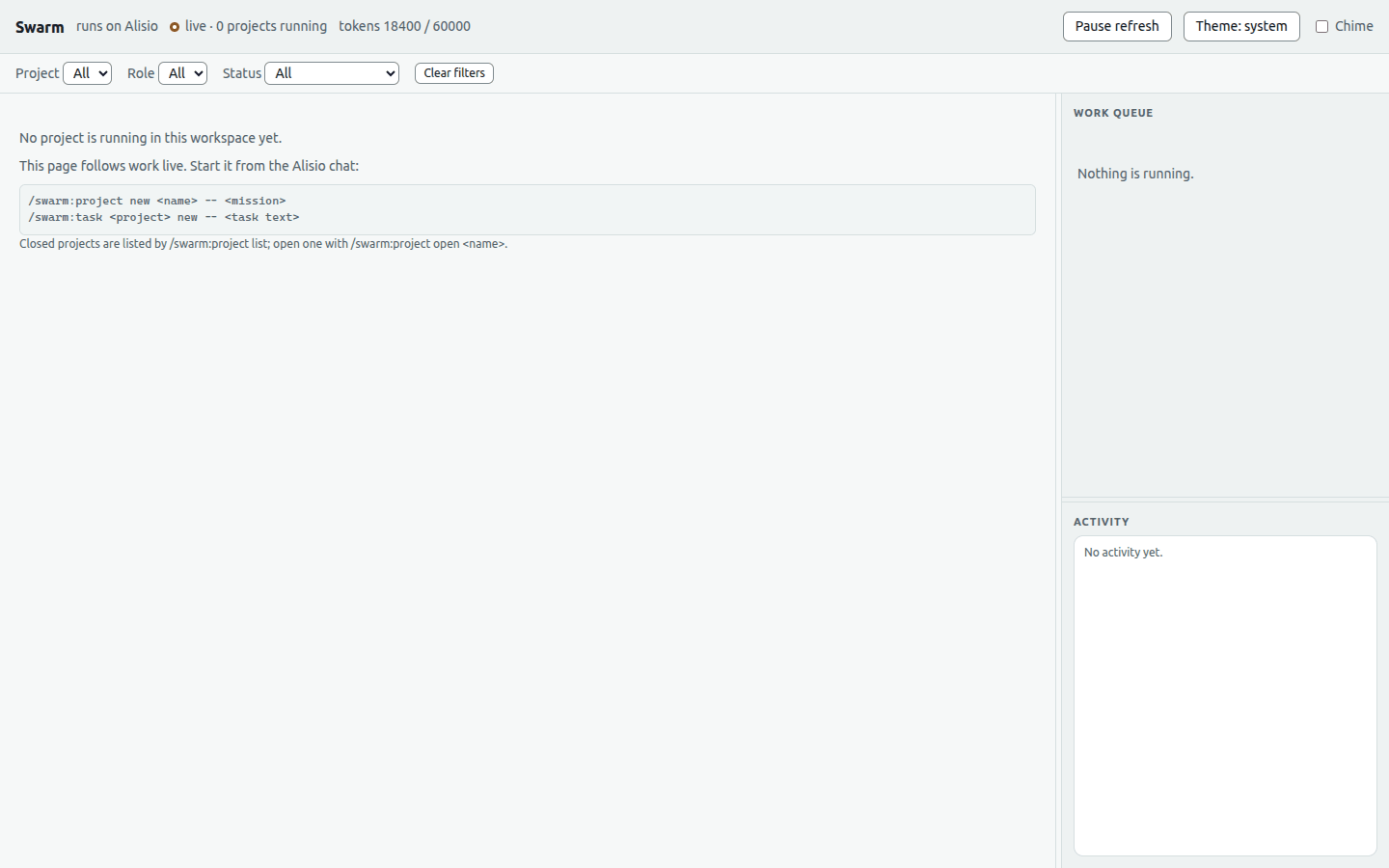
/swarm:dashboard [project | project/task] starts a local web page on 127.0.0.1 (ephemeral port), prints its link and tries to open your browser; the optional argument deep-links to a project or card (#project/task). When nothing is running the page tells you to start from the chat (/swarm:project new, /swarm:task new).
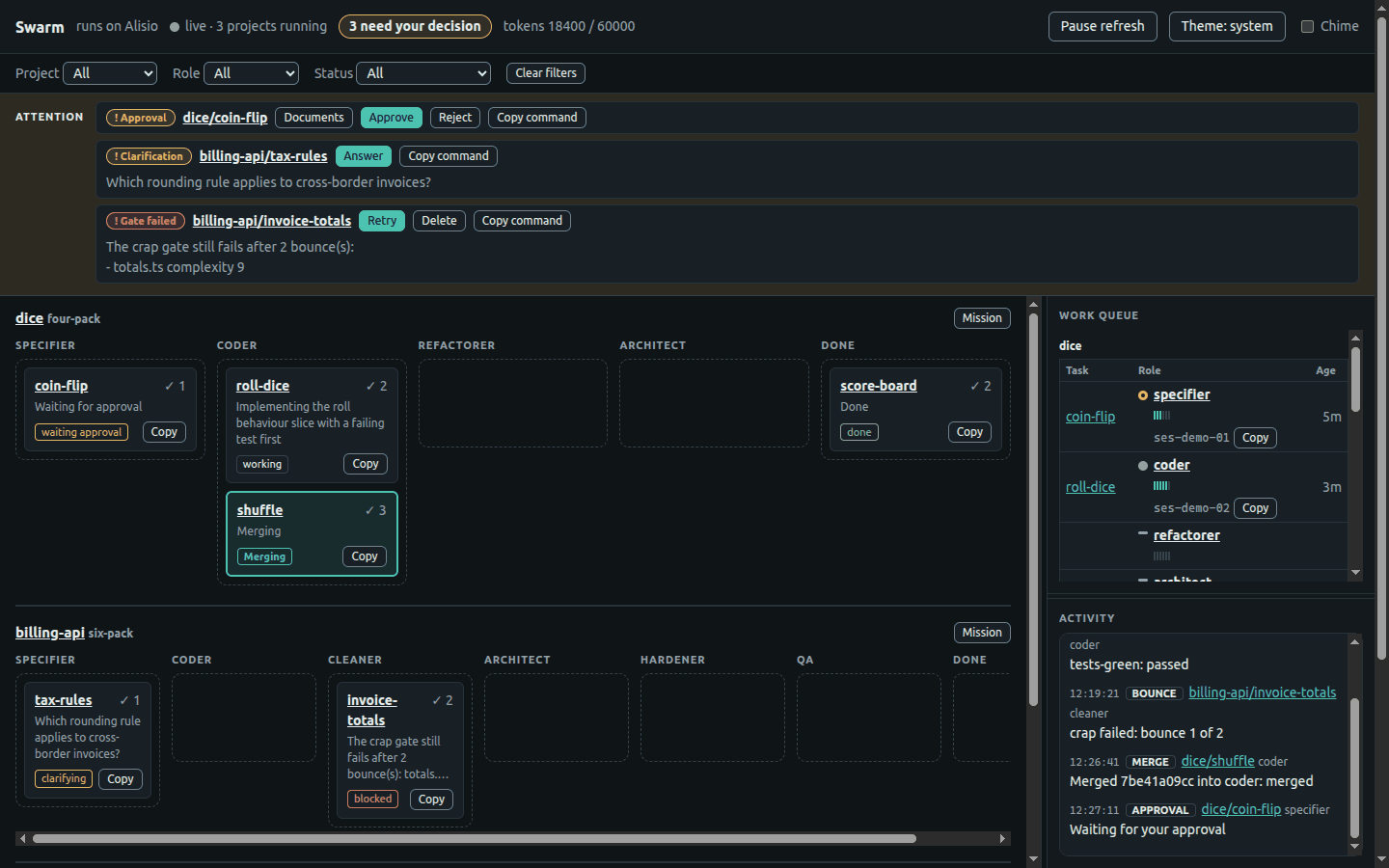
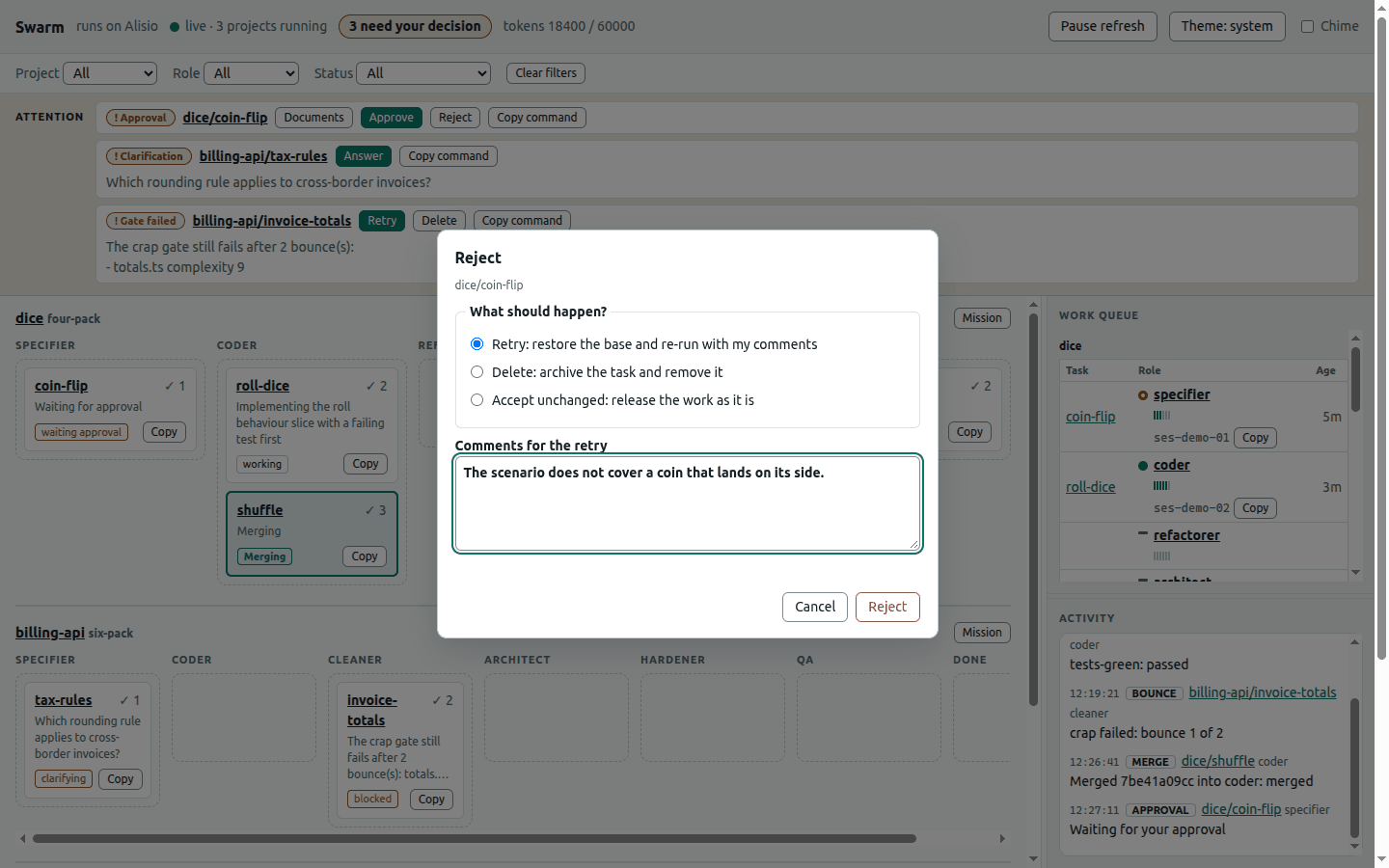
The board with the Attention strip, in the light theme. One Approval, one Clarification and one failed gate wait for you; the shuffle card is highlighted while it merges.
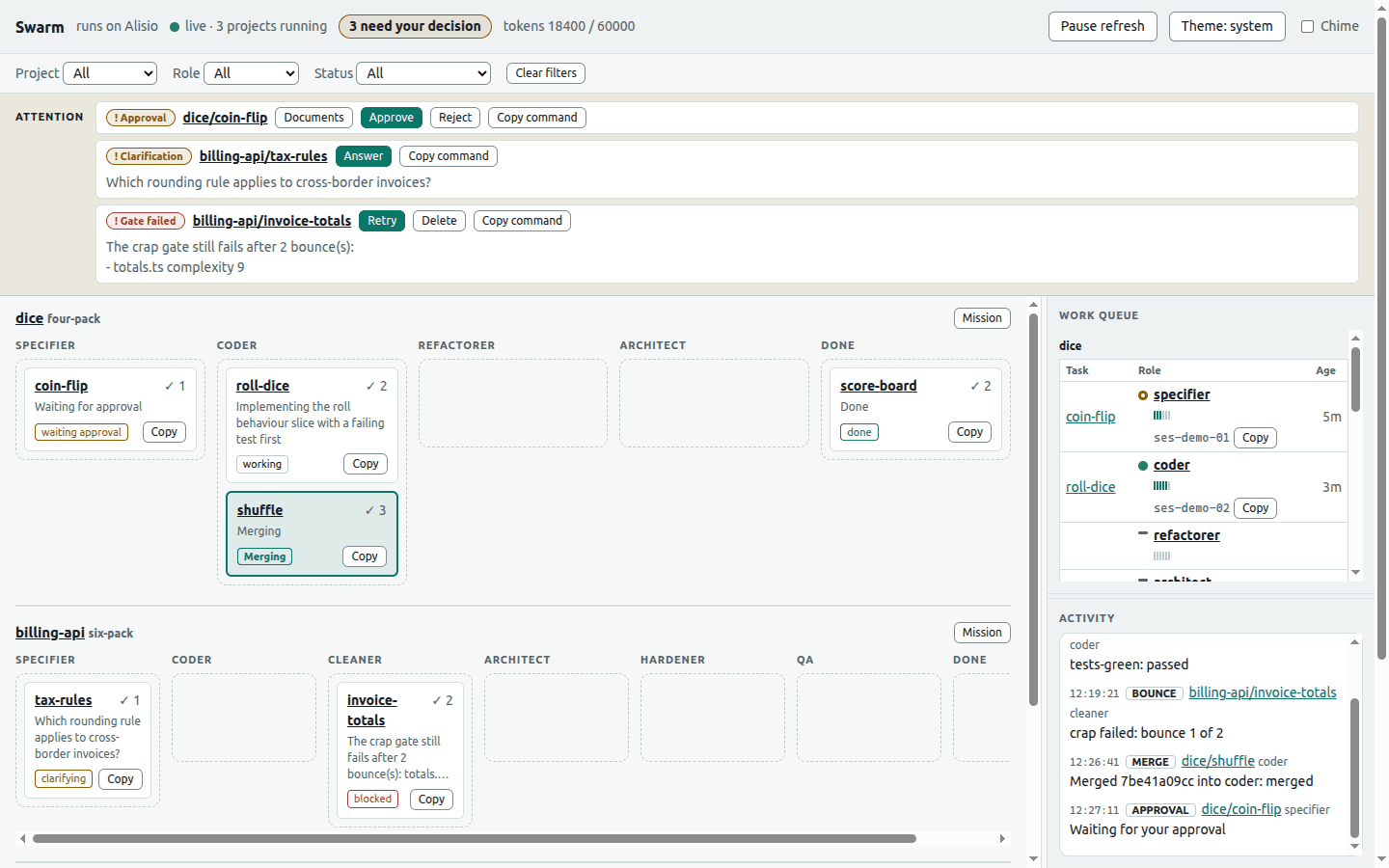
The same view in the dark theme, which follows the system setting unless you override it.
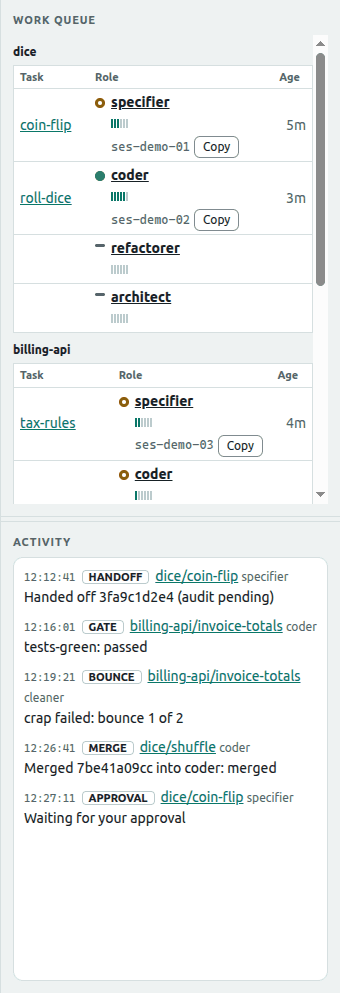
The Work Queue lists every role with a live, idle or none marker (a text label as well as a colour), an activity meter and its Alisio session id; the Activity log records handoffs, merges, gates and bounces.
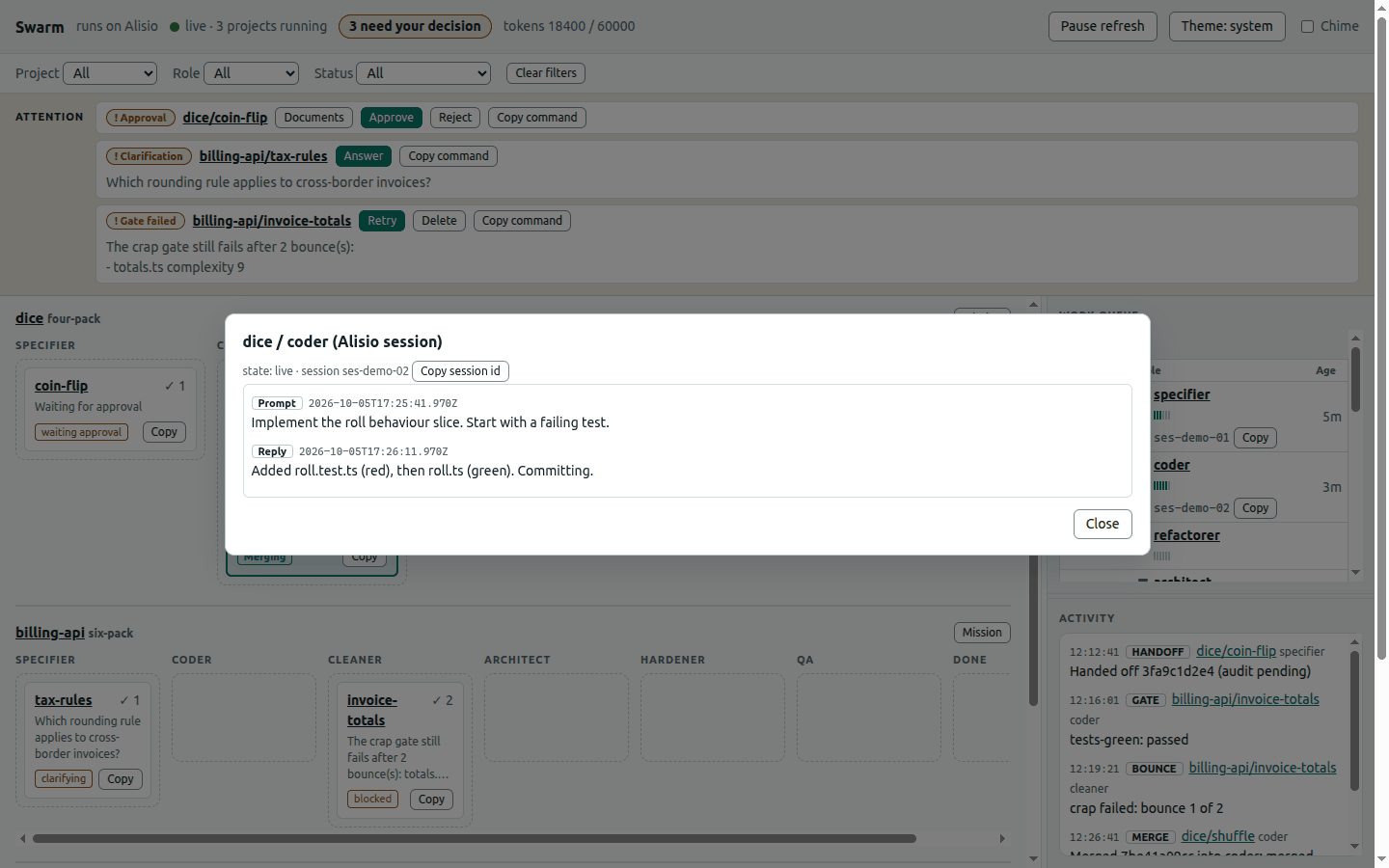
Select a role to read the tail of its Alisio session: the recent prompts and replies.
Documents shows the files held for approval, a side-by-side diff from the role base to the held commit, and your comments. Approve stays disabled while comments exist.
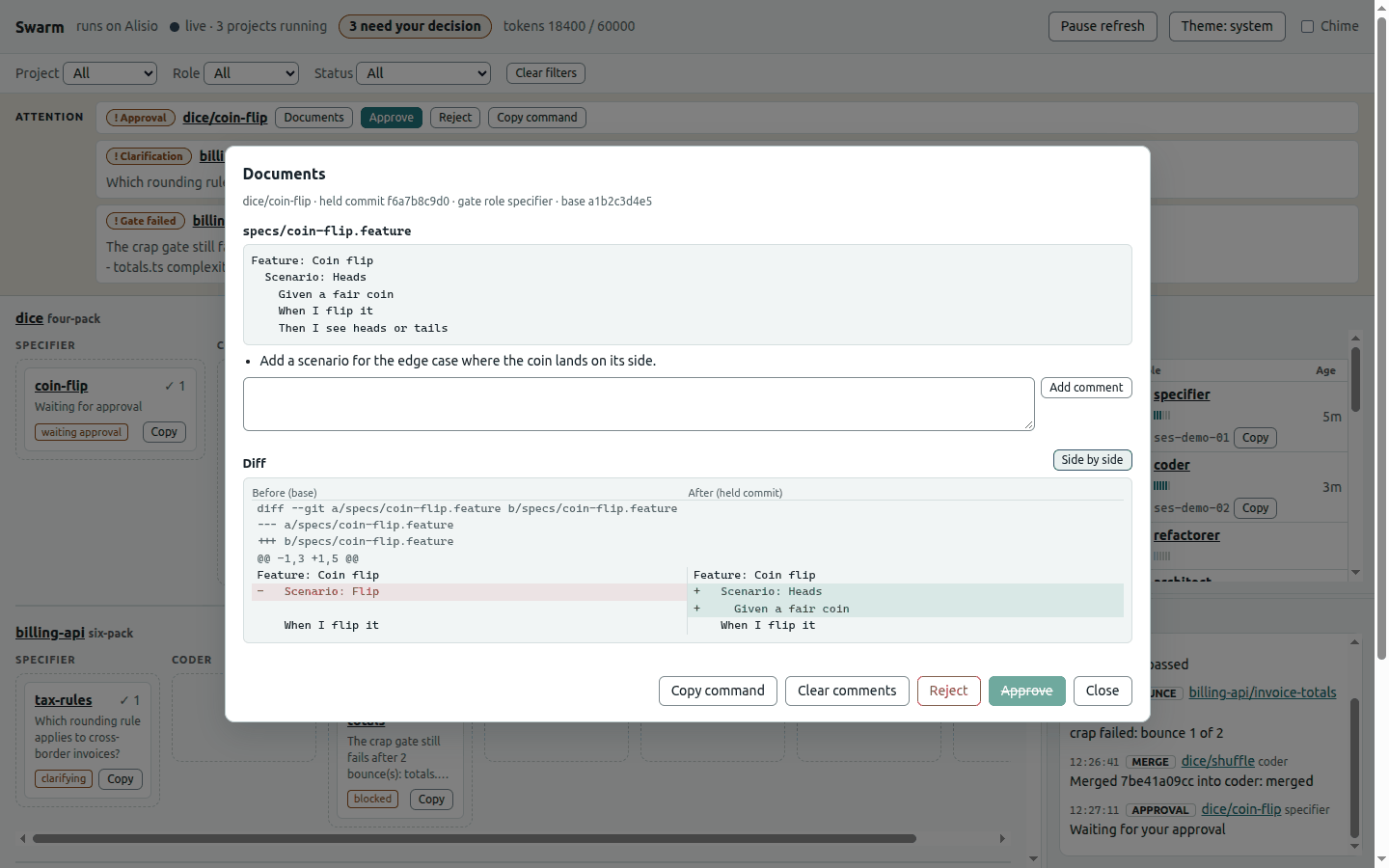
Reject lets you retry with your comments, delete the task or accept the work unchanged.
When nothing is running, the page tells you to start from the Alisio chat.
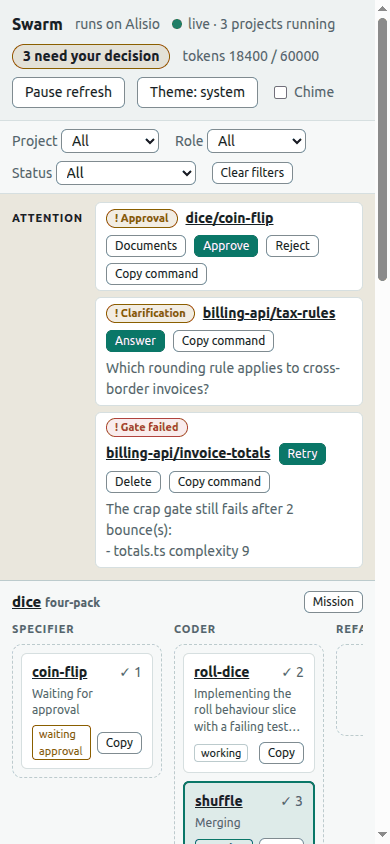
It also works at phone width.
All screenshots use synthetic demo data served by demo/dashboard-demo.mjs.
| Part | What it shows or does |
|---|---|
| Top bar | Live chip, a "needs your decision" count (also in the tab title and favicon badge), token budget, pause refresh, theme and chime. |
| Filters | Project, role and status; pause refresh while you read a long diff or transcript. |
| Attention strip | Approval, Clarification, Blocked and Gate failed items with Documents, Approve, Reject, Answer, Retry and Delete, plus a button that copies the equivalent chat command. |
| Board | One band per running project, one column per pack role plus DONE; cards show audit count, a status snippet, a merging highlight and a copy-command button. |
| Work Queue | Task, role, age, a live/idle/none marker with a text label, a 0 to 6 activity meter, the Alisio session id with a copy button, and the recent prompts and replies of a role. |
| Activity | Recent handoffs, merges, gate results, bounces and approval waits. |
| Documents | Task files, a side-by-side or unified diff from the role base to the held commit, and per-document comments (Approve stays disabled while comments exist). |
It follows the system light or dark setting (with an explicit override), uses design tokens aligned with the Alisio web app, works at phone width and never relies on colour alone. The only changes it can make are the gate decisions above, and they call the same services as the commands. It cannot create, open, close or tear down projects or tasks, and has no chat: that is an owner decision, so the page never duplicates a command.

The page polls /api/state every two seconds. Without a host that can show it, the same data is available as /swarm:status (tables and a mermaid pipeline), a ui.panel tree (projects, roles, tasks) and the read-only swarm-board data view; each is registered only when the host offers it. To inspect the UI without a host, from a repository checkout build the package and run node demo/dashboard-demo.mjs: it serves the page with synthetic data.
Security
Git and gate commands run with argument arrays and a scrubbed environment, never through a shell. Identifiers and paths are validated, project paths cannot escape their root through symlinks, and persisted files are written atomically with private permissions and a schema version.
The dashboard binds to loopback only. Every request needs a random 256-bit token (a cookie for reading, a header for changes), a loopback Host and, when present, a local Origin; there is no CORS, the content security policy is default-src 'self', bodies are capped at 256 KiB, every identifier is validated and all agent and task text is rendered as text. The link printed by the command carries the token: do not share it. Documents are read from the git object store, so no path can leave the repository. The plugin never pushes or opens pull requests.
Limits
- Not verified against a live host: background pump execution, concurrent child runs, headless
permission: ask, and a child workspace that is a worktree (see "Running it for real"). - The SDK has no transcript API: the role activity shown in the dashboard is what the plugin recorded (bounded prompts and replies), not the host transcript.
- Child agents cannot call plugin tools; they answer with JSON envelopes only.
- v1 ships the
node-tstoolchain only; thestructuregate is skipped with a stated reason. - No tmux or external CLI agents; no pushes or pull requests; Windows is not a target beyond not crashing.
- Thresholds are our defaults, not SwarmForge's, which publishes none.
Attribution
Inspired by SwarmForge by Robert C. Martin (unclebob/swarm-forge). This is a clean-room implementation of the ideas; no upstream text or code is copied, and the upstream licence has not been confirmed.
License
MIT