
ReportForge
Editorial HTML/SVG reports and infographics from your sources, printable to PDF.
Install
alisio install npm:@alisio/plugin-reportforge@0.1.2Metadata
| Package | @alisio/plugin-reportforge |
|---|---|
| Version | 0.1.2 |
| Published | Nov 11, 2026 |
| Author | Alisio |
| License | MIT |
| Categories | Tools, UI |
| Size | 684.9 kB |
| Dependencies | 2 |
| Peer dependencies | 1 |
| Downloads (last month) | — |
| Source | First-party |
| Keywords | alisio-plugin, reports, infographic, html, svg, pdf |
Español. Both READMEs must be updated together.
ReportForge turns your data, documents and web pages into editorial-quality reports and infographics: executive summaries, KPI cards, charts, tables and timelines, written by the Alisio model you choose and laid out ready to print. It is made for people who need to communicate data clearly without layout or design skills: managers, analysts, consultants, teachers and researchers.
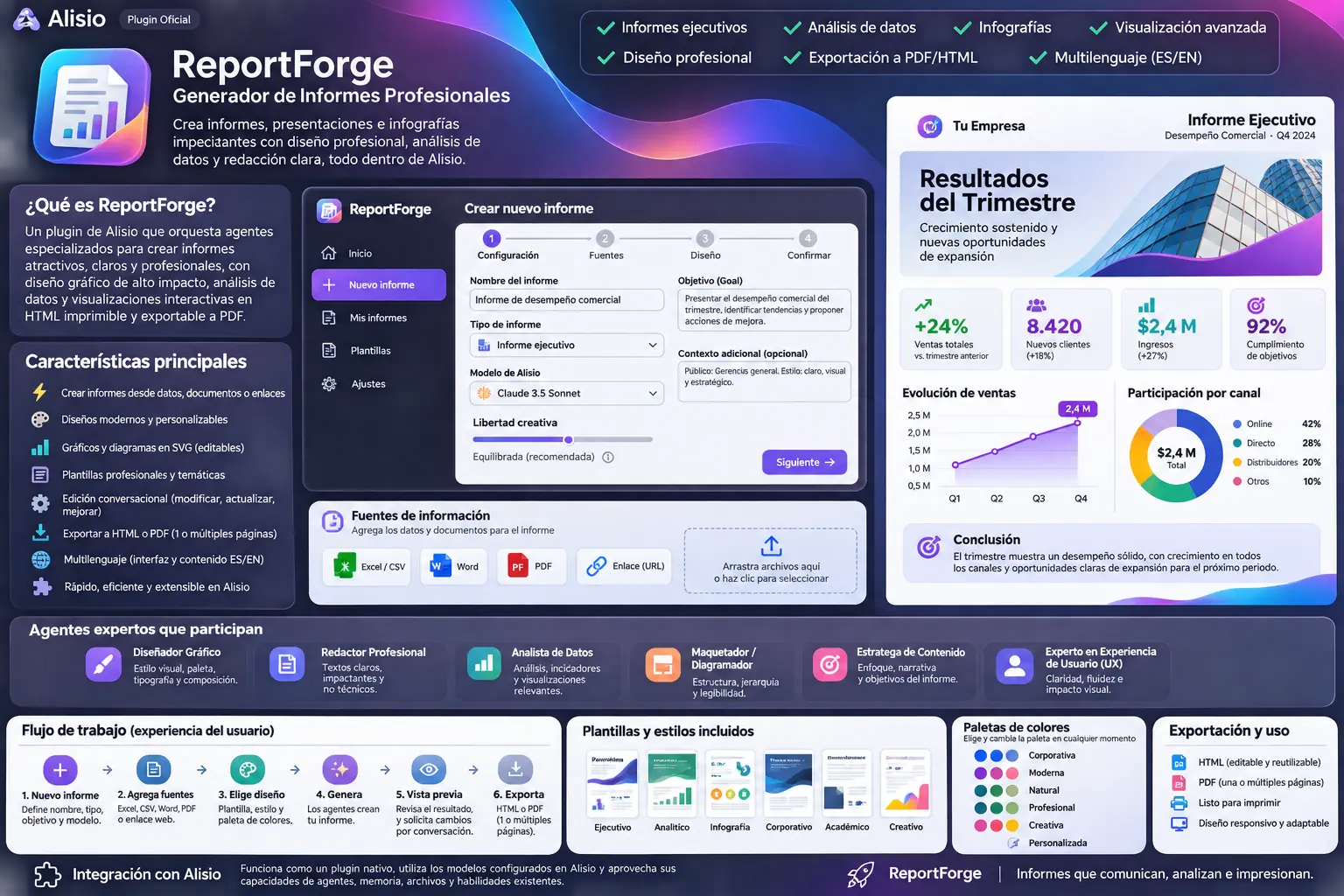
Design concept (in Spanish). Some elements it shows, such as templates and settings screens, are not part of 0.1.0.
Requirements
- Alisio 0.11.6 or newer within 0.11.x (the studio is a plugin app with approval prompts). On older hosts only the read-only tool
reportforge_reportsand the help command work. - A connected model provider (
/connect). ReportForge asks for no credentials of its own. - For ↓ PDF: a Chromium-family browser installed on the machine that runs Alisio (Google Chrome, Chromium, Microsoft Edge, Brave, Vivaldi or Opera; nothing is downloaded), and a session that allows running programs. Set
ALISIO_REPORTFORGE_CHROMEto the browser's executable if it is installed in an unusual place.
Install
alisio install npm:@alisio/plugin-reportforgeThen open ReportForge from your project's Apps group.
Use the studio
- New report: give it a name, type (executive, financial, technical, marketing, operations, research, infographic or custom), report language (English or Spanish, independent of Alisio's language), model, creative freedom, goal, context and audience. Pick one of six palettes.
- Add sources: CSV, Excel (XLSX), Word (DOCX), PDF with text, TXT, Markdown, JSON or HTML files up to 8 MB each, and public HTTPS web pages. Up to 30 sources per report. Remove a source with Remove.
- Generate report: the model writes the report as structured blocks while you wait; you can Cancel. Ten block types: lead, paragraph, quote, KPI, bar, line and donut charts, table, timeline and callout. If the answer cannot be used (cut off, unreadable or without enough valid blocks), ReportForge asks the model once more for a compact report; invalid blocks are left out and the studio says how many. When generation fails, the message says why.
- Refine: ask for a change in plain words (Request a change), or edit a chart directly: columns it spans, height and its data (labels and values). Palette, columns (1 to 3), page size (A4 or Letter) and layout change instantly without calling the model. Model for the next generation changes the report's model (or picks the Alisio default model); if the saved model is no longer available, the studio says so and uses the default.
- Export: ↓ PDF creates the PDF with your local browser (headless, offline, in a throwaway profile) and downloads it, named after the report's title; you can Cancel it. ↓ HTML downloads a single self-contained HTML file.
- Delete: Delete report (in the open report or the list) asks for confirmation, stops a generation in progress and removes the report with its sources.
The studio follows Alisio's language (English or Spanish).
Output
Self-contained HTML: one file with inline CSS and SVG charts, no JavaScript, no remote fonts or resources. It opens offline in any browser.
Multiple pages: printed with page margins, no charts or KPI cards split across pages, and no headings left at the bottom of a page.
Fit to one page: the studio measures the report at the printable width of the chosen sheet and computes the one zoom factor that fits it on a single page. Text and charts stay vector (sharp at any zoom); nothing is clipped. Below about 55% the studio warns that the text will be small, and past 20% it recommends multiple pages. The fit is stored with the report, so the downloaded HTML prints the same way.
PDF: the same HTML printed by the local browser with its backgrounds, the report's page size (A4 or Letter) and margins. For one-page reports the printing browser re-checks the stored zoom and lowers it slightly if the page would otherwise spill onto a second sheet.
If no browser is found, or the session does not allow running programs, the studio says so: use ↓ HTML, open the file in your browser and save it as PDF from there.
Safety
- Reports never invent figures by design: the model is told to use only your sources and to state what they do not cover, and every block it returns is checked (types, sizes, finite numbers) before it reaches the report. It runs in a read-only child session with no tools and no write or process permission. Text inside your sources is treated as data, never as instructions.
- Everything shown in a report is escaped; exported HTML contains no scripts.
- ↓ PDF is the only action that runs a program (the session's process permission): the local browser starts headless with a temporary profile that is deleted afterwards, the report is injected without a file or URL, host names do not resolve, the network is offline and every request except inline
data:content is blocked. A cancel or a two-minute limit kills it. - Web pages: only public HTTPS addresses on port 443. Every DNS answer must be a public address (private, loopback, link-local, cloud metadata and special IPv6 ranges are refused), the connection is pinned to the checked address, every redirect is checked again, and pages are limited to HTML, 2 MB and 12 seconds.
- Office files are read without running macros or unpacking embedded media; PDF text is read with PDF.js without fonts or WebAssembly.
Data
Reports live in Alisio's private plugin state, one folder per workspace, one JSON file per report (written atomically). Generated HTML is always rebuilt from that document, never stored.
Limitations
- Scanned PDFs need OCR, which is not included; images inside documents are ignored.
- Generation asks for up to 32,768 output tokens (less when the model's catalog allows less) and a report of at most 12 components; models with very small output limits may produce shorter reports.
- The studio has been tested against a simulated host and in unit tests. ↓ PDF needs a Chromium-family browser on the machine that runs Alisio and a session that allows running programs; PDFs larger than 40 MB are refused (use the HTML download, as above).
Resources
Agent rf-editor, skill rf-design (editorial design rules), read-only tool reportforge_reports, command help, and the ReportForge app.
Development
pnpm --filter @alisio/plugin-reportforge test
pnpm --filter @alisio/plugin-reportforge build
Tests use a fake model, a fake host and a local HTTP server; they never call a real model or the internet.
License
MIT. PDF.js (pdfjs-dist) is Apache-2.0 and fflate is MIT.